

Back in the day of Windows SharePoint Server 2 and SharePoint Server 2003 you couldn’t use [Today] in Filters.
For example if you tried to setup a filter like this to show items added in the last 7 days
![Created is greater than [Today] - 7](http://blog.pentalogic.net/wp-content/uploads/2008/11/today-in-wss2-fitler.png "today-in-wss2-fitler")
Created is greater than [Today] – 7
You would receive an error “Filter Value is not a valid date” when clicking OK
This lead to all sorts of inventive work arounds including calculated columns to add 7 days onto the Created date and the trick to use [Today] in calculated columns.
After kicking up a bit of a storm with some ill considered remarks in a post explaining the limitations of the [Today] trick I realised I had some of my own old posts that needed updating. Live by the sword…
The Truth about using [Today] in Filters
In WSS 2 / SPS 2003 you could not use a filter containing a [Today] formula as shown above.
In WSS 3 / MOSS 2007 you can. If you try
Created is greater than [Today] – 7
you see a similar error –
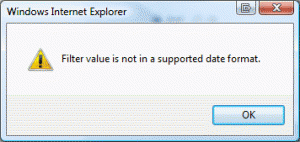
"Filter value is not in a supported date format"
Try taking out the spaces…
![Created is greater than [Today]-7](http://blog.pentalogic.net/wp-content/uploads/2008/11/today-in-wss3-filter.gif "today-in-wss3-filter")
Created is greater than [Today]-7
Yup, that easy.
Just to make clear – you can use other fields. For example to to show all the tasks due in the next 7 days or overdue.
Due Date is less than [Today]+7 AND Status is not equal to Completed
If you are writing CAML queries then see this post about using the OffsetDays attribute.
|
Free SharePoint Calculated Column Cheat Sheet |
| a handy 3 page reference for calculated column functions and formulas. |
 |
Tags: Formula, SharePoint, Today


Thanks for that – a space was riving me mad!
thank you. i was cursing the stupidity of not being able to do this.
Hello,
In the filter view I can filter by [Today] which apparently uses just the date for today. How can I do the same thing, but include the current time? So I’d like to filter against Date/Time.
Thanks,
Richard
@Richard – afraid there is no way AFAIK to do this – you don’t have a [Now] function like you do in Excel.
What are you looking to do with this? Blatant plug but you can use our Highlighter product to do things like highlight in red anything that should have been completed by “Now” and this can include the current time – http://www.pentalogic.net/sharepoint-products/highlighter
How can I use this to display items due in the next 7 days but not overdue?
[Status] is not equal to “Completed”
AND
[Due Date] is less than [Today]
AND
[Due Date] is greater than [Today]-7
thnx a ton !!!
This post helped me a lot 🙂
I’m trying to figure out a way to use this filter “trick” to have a calculated column that shows the number of days open (Created – Today’s date) that will update every day. I used the much talked about “today” then delete “today” column trick, but that is obviously not updating on a daily basis.
Any ideas? I don’t want to look at a due date or a completed date – just need it to calculate age of item.
Thanks!
@Sarah. Yeah that [Today] trick in calc columns doesn’t work and there is a link in the post above that explains why.
There is no easy way to do a count-down or count-up (as in your case) between two dates and you need to go the extra mile.
This post gives you some options – http://blog.pentalogic.net/2011/05/how-to-create-a-countdown-in-a-sharepoint-list/
Hello there
I’m struggling to ascertain from my research online whether or not this has been addressed by Microsoft. I use the ‘Now()’ function in Excel for a list I need to move over to SharePoint (we’re running 2007 on MOSS). The list needs to do the following:
Compares a ‘deadline date’ (a manually entered date when a new list item is created) with today’s date (i.e. the day the list is accessed) that gives a value of ‘Red’ if today’s date is at least one day beyond the deadline date, ‘Amber’ if today’s date is equal or within 18 months of the deadline date and ‘Green’ if the deadline date is beyond 18 months of today’s date.
..and, you’ve guessed it – ‘today’s’ date must reflect the date the list is accessed!
The colours aren’t actually important, I just need a formula that displays the name of the colour. Whilst your filtering method above could achieve this, it wouldn’t be as effective as each list item being labelled with the appropriate R, A, G status (should we need to export the list and share outside of SharePoint). Workflows aren’t required, we simply need to show the R, A, G status of the items.
Many thanks
Tim
@Tim – Today works in filters, but never has worked in Calculated Columns (aka Formula) and is never likely to – see link on “Limitations of Today trick” above.
If you want to do something like conditional formatting depending on if something is overdue then you have to either
a) Do it using SharePoint Designer http://blogs.msdn.com/b/sharepointdesigner/archive/2008/02/25/filtering-and-formatting-with-date-values.aspx
b) Do it usign javascript http://spjsblog.com/2011/11/29/compare-date-with-today-status-indicator-in-list-view/
or c) Buys something like our Highligher tool which makes this and more really easy!
http://www.pentalogic.net/sharepoint-products/highlighter/h-manual/h-example-uses/h-eu-overdue
Thanks for the very prompt response, Ryan!
I also realise that you’ve had to repeat some of your previous advice so thanks for that too.