Posts Tagged ‘SharePoint alerts’

SharePoint Highlighter Released for Sale – See it, Try it, Buy it!

Date:May 6th, 2011 Author: Tags: , ,
Category: General, Highlighter, SharePoint Ideas Comments:0 ;
At last we are there!

After months of heated debate, midnight-oil-burning and general blood, sweat and tears, our latest new product, SharePoint Highlighter is released for sale today!SharePoint Highlighter Features
So come on, what are you waiting for? Get those credit cards out! You know you can’t do without the ultimate tool-kit for brightening up your SharePoint lists!

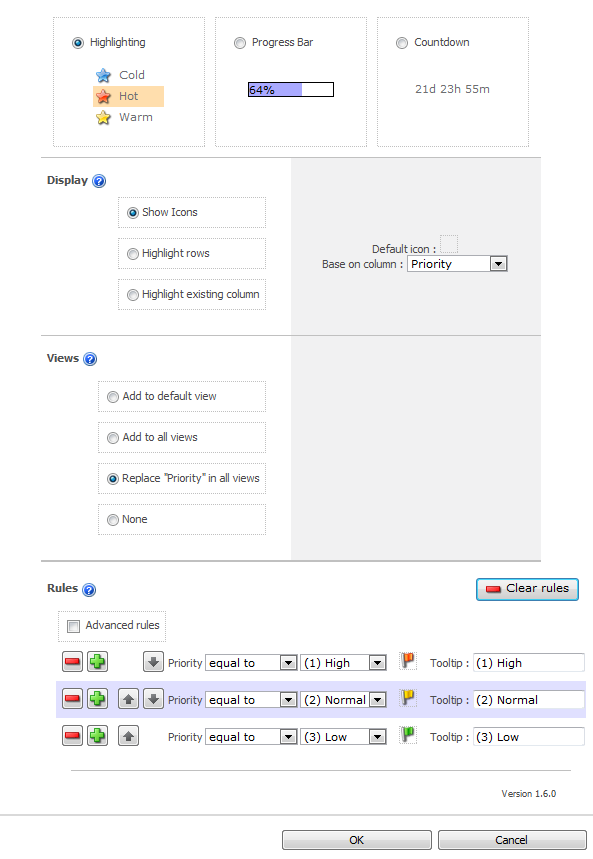
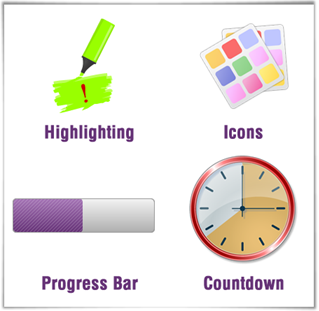
We realise that although Highlighter has been the centre of our universe for the last few months, some of you may have had other things to think about.  So, in case you have forgotten Highlighter is a custom column for SharePoint that lets you add:

  • Highlighting,
  • Color coding
  • Icons
  • Progress bars
  • Countdowns
  • And more

Let’s face, it compared to a lot of things we look at on our screen every day – things like the Facebook Wall, or a Google Search, or even an Outlook Calendar – a SharePoint list can look pretty dull.  You can easily find yourself staring at a mass of information, wondering “What is exactly is going on here?”, and “What on earth am I supposed to do with this?”

So Highlighter gives you a whole box of tricks to brighten up those lists and libraries, and make them much more user friendly.

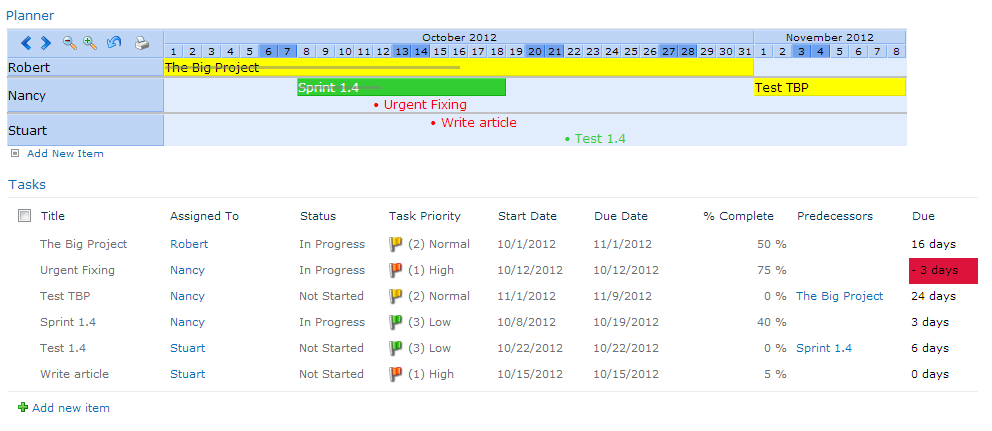
You might choose to highlight high priority items in red on an issues list.
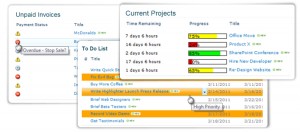
Or flag unpaid invoices by color, depending on just how old they are.

Or use color coded progress bars to show where you are in relation to your KPI’s or targets.

Or countdown to a task or event due date.

The possibilities are endless and with Highlighter you have a whole range of visual indicator options, allowing you to mark up your lists exactly as you want them.

We set ourselves two challenges when developing Highlighter:

  • Give people flexibility, a choice of options within one product.
  • Keep it simple, and easy to use.

We looked at what was on the market already and we found that although you can buy a progress bar, or a color coding column, or a KPI column for SharePoint, there isn’t anything out there that gives you a whole bundle of these options, all in one tidy product.  In fact, to get all the features you will find in Highlighter from anywhere else you would have to go to at least 3 different software providers – and pay more than double the money. 

So we think we are there with the flexibility, but what about ease of use – don’t all these choices make for a really complicated set up interface?

Well, hopefully not.  The really complicated (and powerful) bit is there, in our “Advanced Rules” section, but lots of people will never have to use this.  We have spent time developing the user interface, making it intuitive, so that lots of scenarios are actually set up semi-automatically.  When you use the software you will see that what you want to achieve can often be managed in just a few clicks.

So, what’s this all going to cost then?  Well just $345 for a Starter Pack and $995 for a single server license – cheap at half the price we think.

Plus, of course our 30 day free trail, which will give you plenty of time to see just how handy Highlighter is.

We hope you will give the product a try, and look forward to hearing your feedback.

Download the 30 Day Free Trial Today.
5 Things you never knew you couldn’t do with SharePoint Alerts

Date:July 19th, 2010 Author: Tags: , , ,
Category: General, SharePoint Alert, SharePoint Ideas, SharePoint Reminder Comments:1 ;

We often hear that communication is key to the success of any enterprise or organization. Making people aware of “what’s going on” is an essential.  So for a collaboration platform like SharePoint tools for telling people what’s happening are a central part of the setup.

SharePoint has it’s built in “Alert Me” feature.  New users seeing this often expect it to deliver functionality similar to that which comes as standard in MS Outlook.  But that isn’t what SharePoint Alerts do.  They tell you when something is added or changed.  This is great for document or content management, but not so good for managing calendars or tasks or projects – when you might prefer to be alerted when something is about to happen, or is overdue – or you might actually want to alert someone else, not yourself.

So here’s a little look at some of the things you might expect to be able to do with SharePoint Alerts but can’t.  And some suggestions as to how you might get round these shortcomings.

(more…)

Use SharePoint Filtered Views to Stop Sending Alerts to Yourself

Date:April 19th, 2010 Author: Tags: , , , ,
Category: Filter, General, SharePoint Alert, SharePoint Ideas Comments:0 ;

How annoying is it when you have just created or amended an item in SharePoint, and you immediately get an Alert email about it?

You know the kind of situation: you might be working in a team list, you have the list set up to alert you when an item assigned to you is added or amended, so as soon as you add or amend an item yourself an alert email pings through to your inbox. Completely unnecessary inbox clutter.

So, lets switch off those annoying “alerts to myself” – has to be an easy one click operation, right?

(more…)

SharePoint Alerts not working?

Date:December 2nd, 2009 Author: Tags: , ,
Category: General, SharePoint Alert, SharePoint Ideas Comments:1 ;

This is one of the most common questions posed in SharePoint forums.

SharePoint built in Alerts are one of the best used features of the system – but also one of the most problematic. There are just so many different ways they can go wrong! And when they do go wrong the internet advice available on how to put them right is very fragmented and often confusing. All manner of suggestions come up – many of then not appropriate to the particular problem the user is having.

(more…)

Pentalogic SharePoint Reminder Webpart v1.6 – now supporting Sharepoint recurring events

Date:September 17th, 2009 Author: Tags: , , , ,
Category: SharePoint Alert, SharePoint Reminder, SharePoint webparts Comments:0 ;

Have you every tried to use any of the SharePoint Reminder or Alert web parts on the market – including ours – with Recurring Events in SharePoint Calendar lists?  They just don’t work do they? If you want to send out Alert/Reminder emails about a regular event you have to set up each and every instance of the event as an individual list item in your SharePoint calendar list. Annoying isn’t it?

That’s what our customers have been telling us – and with the latest version of SharePoint Reminder Webpart we have introduced functionality which will allow you to use Reminder with SharePoint’s handy recurring events feature.

(more…)